
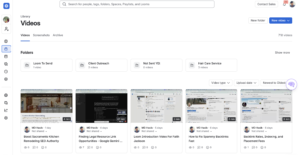

Emails and meetings are not always the most efficient way to explain something.
Sometimes you need to show a client exactly what you mean.
You might need to walk through an SEO report, point out a problem on a website, explain why a particular backlink opportunity makes sense, demonstrate how a tool works, or provide feedback on a piece of content.
Writing a long email can take more time than explaining the same thing verbally. Scheduling a meeting can take even longer, especially when you and your client work in different time zones.
This is where Loom can be extremely useful.
Loom is a screen recording and video messaging platform that lets you record your screen, microphone, and optionally your camera, then immediately share the recording through a link.
I personally find Loom useful because it allows me to explain something to a client without scheduling a meeting every time we need to discuss a small issue.
In this Loom review, I will explain how Loom works, its most useful features, pricing, advantages and disadvantages, who should use it, and how I personally use Loom to communicate with clients and save time.
What Is Loom?
Loom is a video messaging and screen recording tool designed to make visual communication easier.
You can record:
- Your computer screen
- A specific browser tab or application
- Your microphone
- Your webcam
- Your screen and webcam together
Once you finish recording, the video becomes available through a shareable Loom link.
This eliminates the traditional process of recording a video, exporting the file, uploading it somewhere, waiting for processing, and then sending it to another person.
Loom is designed around fast recording and sharing.
According to Loom, its screen recording tools are available across platforms including Mac, Windows, Chrome, iOS, and Android. Videos can also include features such as captions, comments, reactions, annotations, and embedded links. (loom.com)
For freelancers, consultants, agencies, remote teams, developers, marketers, and customer support teams, this can make communication considerably more efficient.
How Does Loom Work?
Using Loom is relatively straightforward.
After installing Loom or accessing its recording tools, you select what you want to record.
You can record only your screen, only your camera, or both simultaneously.
Then you start talking while navigating through whatever you want the viewer to see.
For example, imagine I am reviewing an SEO client’s website and notice that several important service pages have weak title tags.
Instead of writing:
“Go to this page, look at the title, compare it with this keyword, then check the second page…”
I can simply open the website and record my screen.
I can say:
“Here is the page I’m talking about. This title is targeting the wrong phrase. Here’s the keyword I would focus on instead, and this is how I would rewrite it.”
The client can see exactly what I see.
When the recording is finished, Loom generates a shareable link that can be sent through email, Slack, project management software, or another communication channel.
That simplicity is one of Loom’s biggest strengths.
How I Use Loom to Explain Things to Clients Without Having a Meeting
This is probably the main reason I use Loom.
As someone working with clients on SEO, outreach, link building, website visibility, and related marketing work, I often need to explain something visually.
Not every explanation deserves a 30-minute meeting.
Sometimes I only need five minutes.
Suppose I am working on a client’s link building campaign and I find several potential websites where we could secure an editorial mention.
I could write a long email explaining:
Why I selected each website.
What makes the website relevant.
Which page I think should receive the link.
What anchor text might make sense.
Where the link could naturally fit.
Why I think the placement has value.
Instead, I can open the websites, start Loom, and explain everything while the client watches my screen.
I might say:
“This is the first website I found. Let me show you why I think it is relevant. This article is closely related to the page we’re promoting. Here is where I think the mention could fit naturally.”
The client does not have to imagine what I mean.
They can see it.
This is especially helpful when I am doing the type of publisher outreach discussed in my BuzzStream review or managing more advanced campaigns like those covered in my Pitchbox review.
The same approach works for SEO.
If I run an audit and discover something important, I can open the website, Ahrefs, Google Search Console, or whatever tool I am using and simply walk the client through the issue.
I discuss some of the SEO platforms I regularly work with in my Ahrefs review and my article about the AI SEO tools I use.
Loom makes it much easier to explain the information those tools provide.
Loom Saves Me From Unnecessary Meetings
Meetings have their place.
If a client and I need to make an important strategic decision, discuss several complicated issues, or brainstorm together, a live conversation may be the better option.
But many meetings exist simply because someone needs to explain something.
That is where Loom saves time.
Instead of:
“Are you available Tuesday at 2?”
“No, how about Wednesday?”
“Wednesday doesn’t work for me. Can we do Thursday morning?”
I can record a five-minute Loom video and send it immediately.
The client watches it when they have time.
If they have a question, they can reply.
This creates asynchronous communication.
I explain something when it fits my schedule, and the client reviews it when it fits theirs.
That is particularly valuable when working with international clients across different time zones.
Loom itself positions video messaging as a way to communicate asynchronously and reduce the need for unnecessary meetings.
A Five-Minute Loom Can Replace a Long Email
Another reason I use Loom is that some explanations are difficult to write clearly.
Imagine trying to explain where a specific setting appears inside an SEO tool.
You could write:
“Go to the left menu, select the third option, click the dropdown, select the campaign, then look at the graph on the right…”
Or you can record your screen.
“Click here. Then go here. This is the number I’m talking about.”
Done.
Visual explanations reduce ambiguity.
The client can also pause, rewind, or rewatch the recording if they forget something.
That is one advantage Loom has over live meetings.
If I explain something during a Zoom call and the client forgets it two weeks later, they may need to ask me again.
With Loom, they can simply reopen the video.
Loom for Freelancers
Freelancers are one of the groups that can get the most value from Loom.
When you’re working independently, time spent in unnecessary meetings is time that could have been spent actually doing client work.
Loom can be useful for:
Client updates
Website audits
Project walkthroughs
Proposal explanations
Deliverable presentations
Feedback
Training
Reporting
Sales outreach
Technical troubleshooting
For freelancers working through marketplaces, asynchronous video can also add a more personal element to communication.
I have written previously about why I choose to work on Upwork instead of Fiverr, and Loom can fit naturally into a freelance workflow where you need to communicate expertise clearly without turning every project update into another meeting.
Using Loom for SEO Client Reports
SEO reporting can become complicated.
A report may contain:
- Organic traffic
- Keyword rankings
- Backlinks
- Referring domains
- Search visibility
- Technical issues
- Google Search Console data
- Competitor comparisons
- Content performance
Sending the client a spreadsheet does not necessarily mean they will understand what it says.
Instead, I can record a Loom video.
I can open the report and walk through the important numbers.
For example:
“Organic clicks increased here.”
“This keyword moved from position 14 to position 7.”
“This page lost traffic, and here’s what I think happened.”
“These are the links we secured this month.”
“This is what I want to focus on next.”
The client gets both the data and the explanation.
This is much more useful than sending a report with no context.
Using Loom for Link Building and Outreach
Loom can also be useful for link building.
My work often involves identifying relevant websites and finding opportunities to earn brand mentions and editorial links.
There can be many factors involved in deciding whether a website is worth pursuing.
I may look at:
Topical relevance
Site quality
Existing content
Link placement opportunities
Traffic
Editorial standards
Competitor links
Existing relationships
Instead of sending a client ten URLs with no explanation, I can record a video showing exactly why I selected them.
This also makes it easier for the client to approve opportunities.
The process fits particularly well with the approach I describe in my guide on how to manage industry-related link mentions without paying placement fees.
Loom does not perform the outreach itself, but it makes explaining the strategy behind the outreach considerably easier.
Using Loom for Prospecting and Sales
Loom can also be used before someone becomes a client.
Personalized video outreach can stand out from generic sales emails.
For example, imagine contacting a potential SEO client.
Instead of sending:
“Hi, I noticed some SEO issues on your site and would love to help.”
You could record a two-minute Loom showing one specific problem.
You might say:
“I noticed this page is ranking on page two for a valuable keyword. Let me show you what I think is holding it back.”
Then you demonstrate the issue.
This immediately provides evidence that you actually reviewed their website.
It can be especially useful when combined with a well-targeted outbound campaign. My Smartlead review covers how businesses can manage larger cold email campaigns, but Loom can add a highly personalized layer to selected high-value prospects.
I would not necessarily record a Loom for every person on a list of 10,000 prospects.
That would defeat the purpose of automation.
But for a smaller list of particularly valuable prospects, personalized videos can make an outreach message much more specific.
Loom Screen Recording
Screen recording is the core Loom feature.
The platform lets users capture their screen while recording voice commentary, and users can choose whether they also want their webcam visible.
Loom’s current screen recorder supports capture across desktop and mobile environments, and recordings can be shared through a link after they are created.
This works particularly well for:
Software demonstrations
Website reviews
Tutorials
Client feedback
Presentations
Bug reports
Training
Onboarding
Product walkthroughs
One of the advantages is that you do not need professional video production skills.
The objective is usually clarity rather than cinematic quality.
Screen and Camera Recording
Loom can record your webcam while you share your screen.
The small camera bubble provides a human element while the viewer watches what you are demonstrating.
I find this useful when the video is client-facing because the recipient can hear my explanation and also see me speaking.
However, camera recording is optional.
Sometimes screen and voice are enough.
The appropriate format depends on what you are explaining.
Instant Video Sharing
One of the reasons Loom feels faster than conventional video recording is sharing.
You do not need to create a huge video attachment.
You send a link.
Loom describes instant link sharing as one of the core features of its screen recorder.
For client communication, that matters.
I can finish explaining something and immediately paste the Loom link into an email or project conversation.
Video Comments and Reactions
Loom videos can support comments and reactions.
This makes asynchronous communication more interactive.
For example, a client can watch a video and leave a comment if they have a question about something I explained.
Team members can also respond to specific information without requiring another meeting.
The current Starter plan includes comments and emoji reactions.
Transcriptions and Captions
Loom can generate transcripts for videos.
The current Starter plan includes transcription in more than 50 languages, according to Loom’s pricing information.
This can be useful for people who prefer reading rather than watching the entire video.
It can also make recorded information easier to reference later.
For longer explanations, a transcript provides another way to find specific details without replaying the entire recording.
Loom AI
Loom has expanded beyond basic screen recording by adding AI-powered features.
Loom AI can help generate titles, summaries, chapters, written documents, meeting information, and other outputs based on recorded videos.
Loom says its AI tools can also help remove filler words and silences and convert video information into written formats such as documents and issues. (Loom AI)
This is particularly interesting for users who record a lot of process documentation.
Instead of recording a walkthrough and then writing the same instructions separately, AI can help turn the recording into additional written material.
Loom for Team Documentation
One Loom video can be watched repeatedly.
That makes Loom useful for documenting processes.
Imagine hiring a new team member.
Without documentation, someone may need to explain:
How to add a prospect to the CRM.
How to evaluate a website.
How to prepare a report.
How to upload content.
How to use a particular tool.
How to complete quality checks.
Instead of repeating the same instructions for every new person, you can record the process once.
Loom describes this approach as creating a centralized video knowledge resource where teams can store and reuse recordings.
This can be valuable for remote teams where employees do not always work at the same time.
Loom for Client Onboarding
Client onboarding frequently involves repeating similar explanations.
You might need to show a client:
Where reports will be stored.
How to provide access.
How to review deliverables.
What metrics you track.
What happens during the first month.
How communication works.
These explanations can become reusable Loom videos.
Some videos can be completely standardized.
Others can be personalized for individual clients.
This creates a useful balance between efficiency and personal communication.
Loom for Feedback
Giving feedback through text can sometimes create confusion.
Imagine reviewing a new landing page.
You might write:
“Move this section higher, change this heading, shorten the introduction, and make the CTA more visible.”
That works.
But a Loom video can be clearer.
You simply scroll through the page and explain your reasoning.
“This section should move here because…”
“This part feels too long because…”
“I would make this CTA more visible because…”
The recipient gets the instruction and the reasoning behind it.
Loom Pricing
Loom currently offers several pricing tiers.
You can view the latest information directly on the official Loom pricing page.
Starter – Free
The Starter plan costs $0.
At the time of this Loom review, it includes up to 25 videos per person, screen recordings of up to five minutes, transcriptions in more than 50 languages, comments, and emoji reactions.
For someone who only records occasional short videos, this may be enough.
The five-minute recording restriction is the main limitation for users who regularly need detailed walkthroughs.
Business – $18 Per User Per Month
Loom currently lists its Business plan at $18 per user per month when billed monthly.
It includes unlimited videos, unlimited recording time, basic editing capabilities, removal of Loom branding, and additional functionality.
For freelancers and consultants who use Loom frequently, unlimited recording time can make a substantial difference.
Business + AI – $24 Per User Per Month
Loom currently lists Business + AI at $24 per user per month.
This plan adds Loom’s more advanced AI capabilities, including features associated with automated notes, recaps, summaries, chapters, and AI workflows.
Enterprise
Enterprise pricing is customized.
This level is designed primarily for larger organizations requiring additional security, administration, integrations, and enterprise controls.
Because SaaS pricing can change, always check Loom’s official pricing page before subscribing.
Loom Pros and Cons
Loom Pros
Very easy to use
You can record an explanation without needing professional video production experience.
Excellent for asynchronous client communication
Clients do not need to be available at the same time you are.
Can reduce unnecessary meetings
A short recording can replace a meeting whose only purpose is explaining something.
Excellent for visual explanations
Showing something on your screen is often much easier than describing it through email.
Easy sharing
Videos can be sent through a simple link.
Useful for freelancers
Client updates, reports, feedback, audits, and deliverable walkthroughs are natural use cases.
Useful for teams
Videos can help document processes and train employees.
Viewers can rewatch explanations
Unlike a live conversation, a Loom recording remains available for future reference.
Loom Cons
The free plan has recording limitations
Five minutes may not be enough for more detailed client explanations.
Paid plans become more expensive as teams grow
Because paid subscriptions are generally priced per user, the cost can increase when many team members require creator access.
Not every conversation should be asynchronous
Sometimes a live meeting is necessary, especially when discussion, negotiation, or collaborative decision-making is required.
Long videos can waste time
Just because Loom allows long recordings does not mean every video should be 30 minutes.
A good Loom should still be organized and concise.
Video can become another form of information overload
Teams that record everything without organizing their video libraries may eventually find it difficult to locate important information.
How Long Should a Client Loom Video Be?
For most routine client communication, shorter is usually better.
If I can explain something clearly in four minutes, there is no benefit in turning it into a 15-minute presentation.
I generally think of Loom videos in terms of purpose.
A quick clarification may only require one or two minutes.
An SEO issue might need three to five minutes.
A detailed monthly report may take longer.
A strategy review involving multiple decisions might be better handled through a meeting.
The objective is not to replace every meeting.
The objective is to avoid meetings that do not actually require real-time conversation.
Loom vs. Meetings
Loom and meetings solve different communication problems.
Use Loom when one person mainly needs to explain something and the other person needs to understand it.
Use a meeting when both people need to actively discuss something.
For example:
Loom makes sense for:
“This is what I completed.”
“This is the problem I found.”
“This is how this tool works.”
“This is why I selected this website.”
“This is what changed in the report.”
A meeting makes more sense for:
“Which strategy should we choose?”
“We need to negotiate the scope.”
“Let’s brainstorm ideas together.”
“We need input from several people.”
“We need to make an important decision right now.”
Understanding this difference is where Loom creates the most time savings.
Who Should Use Loom?
Loom can work for almost anyone who regularly needs to explain something on a computer.
Freelancers
Freelancers can provide project updates, explain deliverables, record audits, and communicate with clients asynchronously.
SEO Consultants
SEO professionals can explain audits, rankings, content recommendations, backlink opportunities, technical issues, and reports.
Agencies
Agencies can use Loom for client reporting, internal training, project management, and campaign explanations.
Sales Teams
Sales representatives can create personalized product demonstrations and prospect walkthroughs.
Developers
Developers can demonstrate bugs, explain features, and document technical processes.
Designers
Designers can walk clients through layouts and provide visual reasoning behind design decisions.
Customer Support Teams
Support representatives can visually demonstrate how to resolve a problem rather than sending complicated written instructions.
Remote Teams
Asynchronous video is particularly useful when team members are distributed across different locations and time zones.
Is Loom Good for Client Communication?
Yes.
Client communication is where I think Loom provides some of its clearest value.
A client does not necessarily want another meeting.
They want to understand what is happening.
Loom makes it possible to provide a personal explanation without requiring both people to stop what they are doing at exactly the same time.
That makes communication more flexible.
It also creates a record.
If the client wants to revisit the explanation later, the video is still there.
Is Loom Worth Paying For?
Whether Loom is worth paying for depends on how frequently you use it.
If you occasionally record a short video, the Starter plan may be enough.
If you regularly communicate with clients through recordings, the five-minute free-plan limit can become restrictive, making the Business plan more useful.
For larger teams or people who want AI-generated summaries, documents, meeting notes, and other advanced features, Business + AI may make more sense.
For me, the biggest value of Loom is not really screen recording itself.
There are plenty of ways to record a screen.
The value is how quickly I can move from:
“I need to explain this.”
to:
“Here is a link showing exactly what I mean.”
That can replace long emails and unnecessary meetings.
When you communicate with multiple clients every week, those small time savings add up.
Frequently Asked Questions
What is Loom used for?
Loom is used to record and share videos of your screen, camera, and microphone. Common uses include client communication, tutorials, training, sales demonstrations, reports, project updates, feedback, support, and internal documentation.
Is Loom free?
Yes. Loom currently offers a free Starter plan that includes up to 25 videos per person and recordings of up to five minutes.
How much does Loom cost?
Loom currently lists Starter at $0, Business at $18 per user per month, and Business + AI at $24 per user per month when using the monthly pricing shown on its pricing page. Enterprise pricing is customized. Pricing can change, so check the official Loom pricing page for current rates.
Can Loom record my screen and camera together?
Yes. Loom allows users to record their screen, camera, and microphone, including combinations of screen and camera recording.
Can I send a Loom video to a client?
Yes. Once a video is recorded, Loom provides a shareable link that can be sent to clients through email, messaging platforms, project management tools, or other communication channels.
Can Loom replace client meetings?
Loom can replace some meetings, particularly meetings where one person mainly needs to provide an update or explain something. It is less suitable when both parties need real-time discussion, negotiation, brainstorming, or decision-making.
Is Loom useful for SEO professionals?
Yes. SEO professionals can use Loom to explain audits, rankings, keyword opportunities, technical problems, backlink analysis, reports, and strategy recommendations.
Is Loom useful for freelancers?
Yes. Freelancers can use Loom for project updates, onboarding, feedback, deliverable walkthroughs, client reports, proposals, and asynchronous communication.
Does Loom have AI features?
Yes. Loom AI includes features such as summaries, chapters, filler-word removal, written document generation, meeting notes, recaps, and other AI-assisted workflows.
Does the client need a Loom account to watch my video?
Loom is designed around shareable video links, allowing recordings to be distributed directly to viewers. Access can depend on the privacy settings selected for a particular recording.
Is Loom worth it?
Loom can be worth using if you regularly need to explain things visually to clients, colleagues, or prospects. Its greatest benefit is reducing the amount of time spent writing lengthy explanations or scheduling meetings that could have been replaced by a short recorded walkthrough.




[…] I discuss that asynchronous video use case in my Loom Review. […]
[…] use this same principle when explaining complex issues to clients. My Loom Review covers how short screen recordings can reduce unnecessary meetings while making explanations easier […]